
| Share On: | |
|---|---|
| Categories: | Modbus Converters |
| Review: | Write your review |
| Resources: |
 What is Modbus?
It is widely used in many fileds like power generation, water systems, oil, chemistry, and automobile industries. Different fields need different functions, but they use the following features:
When you buy an I-7188E -MTCP controller, it already has the default Modbus firmware installed in Flash memory. The default firmware has the follows features:
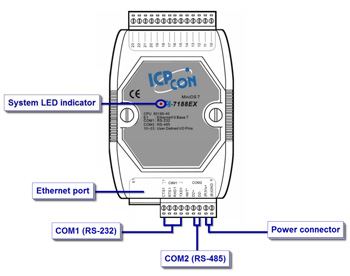
| CPU | |
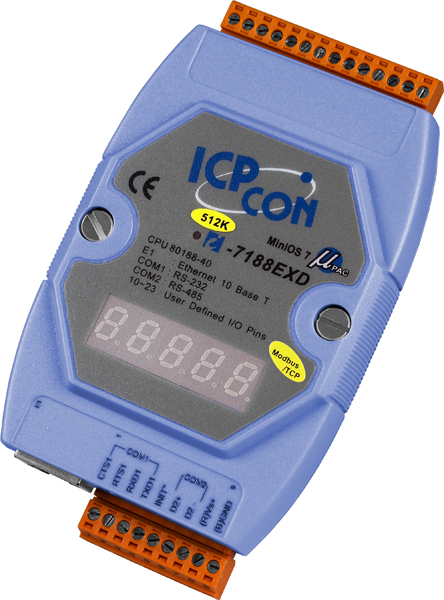
| CPU | 80188, 40MHz or compatible |
| SRAM | 512K bytes |
| Flash Memory | 512K bytes |
| EEPROM | 2K Bytes |
| NVRAM | 31 Bytes (battery backup, data valid up to 10 year) |
| RTC (Real Time Clock) | Yes |
| 64-bit Hardware Serial Number | Yes |
| Built-in Watchdog Timer | Yes |
| Communication Interface | |
| COM1 | RS-232 (TXD, RXD, RTS, CTS, GND) |
| COM2 | RS-485 (D2+, D2-) |
| Ethernet Port | 10BASE-T NE2000 compatible Ethernet Controller |
| COM Port Formats | |
| Data bit | 7, 8 |
| Parity | Even, Odd, None |
| Stop bit | 1 |
| LED Display | |
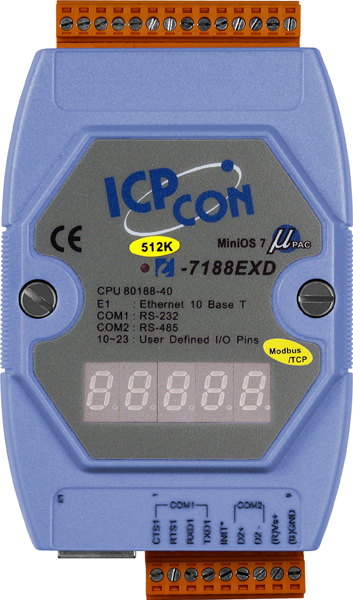
| 5-Digit 7 Segment LED Display | Yes (for I-7188EXD-MTCP only) |
| System LED Indicator | Yes |
| Hardware Expansion | |
| I/O expansion bus | Yes |
| User defined I/O pins | 14 pins |
| Dimensions | |
| I-7188EX(D)-MTCP | 123mm x 72mm x 33mm |
| Operating Environment | |
| Operating Temperature | -25°C to +75°C |
| Storage Temperature | -40°C to +80°C |
| Power | |
| Protection | Power reverse polarity protection |
| Required Supply Voltage | +10 to +30V/DC (non-regulated) |
| Power consumption | 2W for I-7188EX-MTCP 3W for I-7188EXD-MTCP |
Modbus SDK ( in C language )
If the default firmware doesn't totally suit your requirement. You can use Modbus SDK to modify the default firmware to add extra functions. The Modbus SDK has below features:
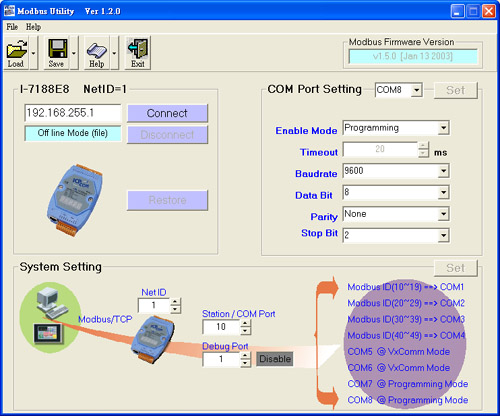
Modbus Utility
We provide Modbus tools for Windows 98/SE/NT/2K/XP, it includes:
Typical applications
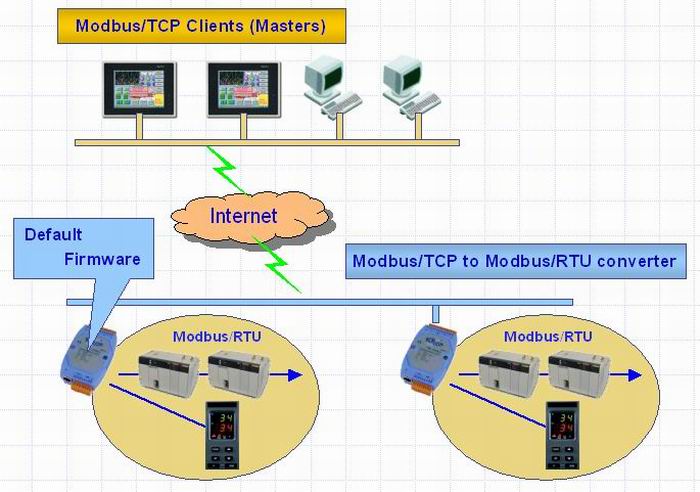 Basic application 1: protocol converter
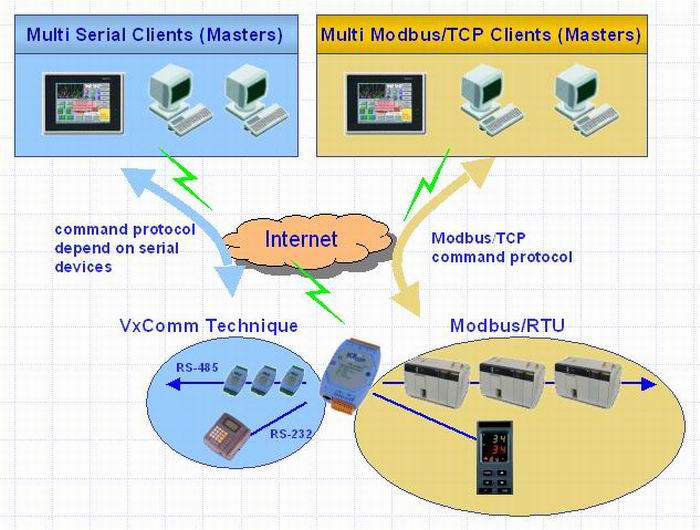
An I-7188E -MTCP runs a default firmware to become a single Modbus/TCP to multi-Modbus/RTU converter. You can simply use the Modbus Utility to configure the device and then set connection between SCADA , HMI software and the I-7188E.
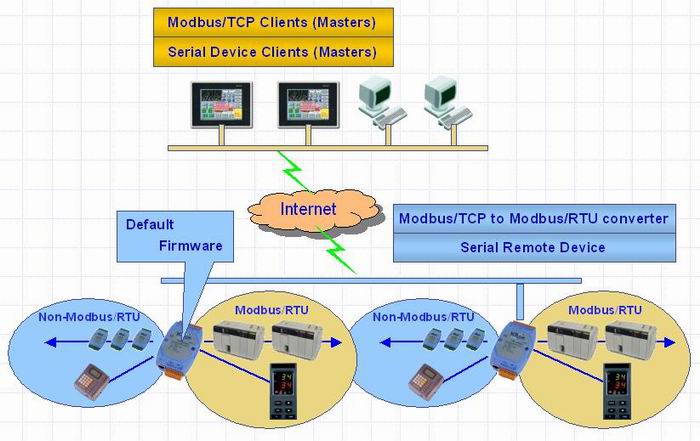 Basic application 2: protocol converter with VxComm technique
An I-7188E -MTCP is also be able to link to serial devices that don't support Modbus/RTU. To use this function, you will need to install VxComm driver on host PCs. After installation, you will be able to access the remote COM ports via the standard serial driver.
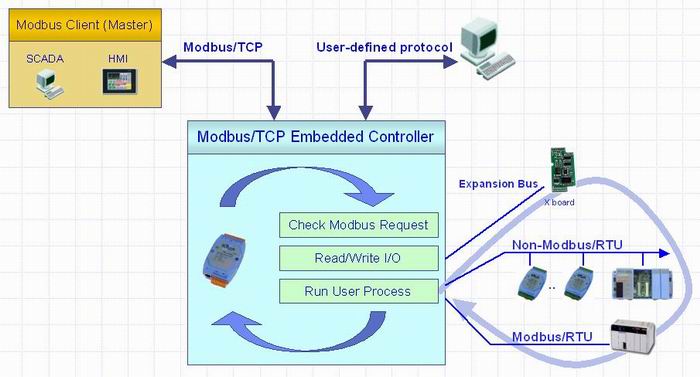
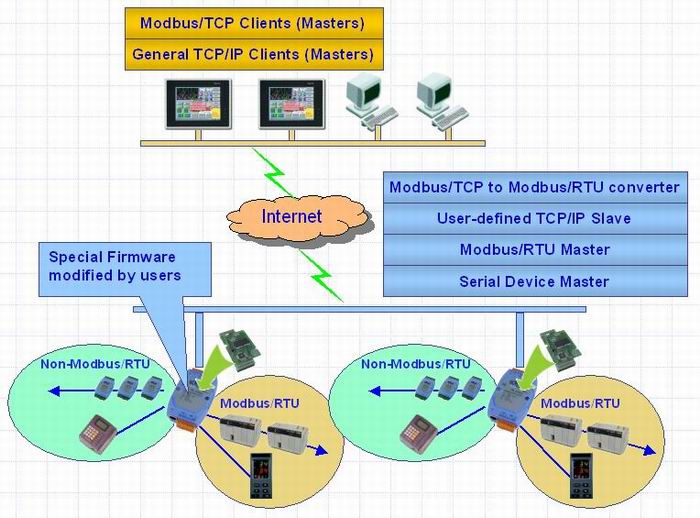 Advanced application 1: Modbus/TCP controller
Using the Modbus SDK, users can develop their own custom Modbus firmware, allowing extra functions, integration of serial devices and a Xboard to the Modbus/TCP kernel. Thus an I-7188E can become a powerful controller.
Advanced application 2: Modbus/TCP controller with VxComm technique
When an I-7188E -MTCP links same hardware devices as Advanced application 1 link to, if any devices connected to certain COM ports are not integrated into your custom firmware, you are still able to access the COM ports via the standard serial driver. In order to do this, you must install the VxComm driver on the host PCs.
Our mission is to provide the absolute best customer experience in industrial automation and electronics, without exception.


Subscribe to our mailing list today and join thousands of others who want to stay up-to-date with the latest news in data acquisition and industrial data communication.
ICP DAS USA is a leading manufacturer of industrial data acquisition, data communication, programmable controllers, wireless and software solutions.
 I/O Expansion Board Options
 Hardware
 Quick Start
 Maple Systems Modbus RTU Slave Guide
Add a review
Your email address will not be published. Required fields are marked *