How to Online Debug WinPAC Programs in eVC++
Debugging is a process that you use to find and resolve errors, or bugs, in a program. This video demonstrates how to online debug the eVC++ programs which run on WinPAC-8000..
WinPac Windows CE PAC
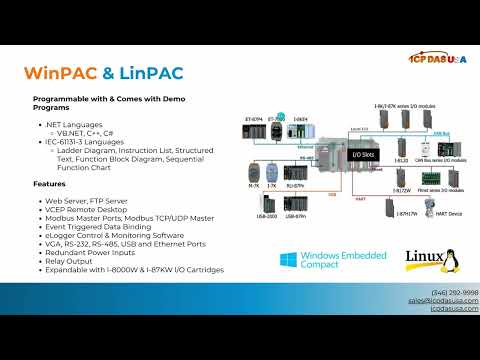
WinPAC-8000 is our second generation Programmable Automation Controller. It is equipped with a PXA270 CPU (520MHz) running a Windows CE.NET 5.0 operating system, variant conductivities (VGA, USB, Ethernet, RS-232/485), and 1/4/8 slots for high performance parallel I/O modules (high profile I-8K series) and serial-type I/O modules (high profile I-87K I/O modules).In comparison to the first generation WinCon-8000, WinPac improves the CPU performance (from 206 MHz to 520 MHz), upgrades OS (from CE 4.1 to CE 5.0), and reliability features, such as dual LAN, redundant power input, dual battery backup SRAM, etc. It gives you all of the best features of both traditional PLCs and Windows capable PCs).