
| Share On: | |
|---|---|
| Categories: | PCI Communication Boards |
| Review: | Write your review |
| Resources: |  User's ManualData Sheet Quick StartOCX Manual User's ManualData Sheet Quick StartOCX Manual Software Software Demo Programs Drivers Demo Programs Drivers |
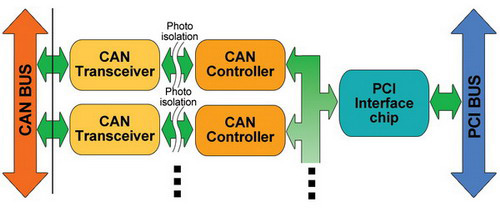
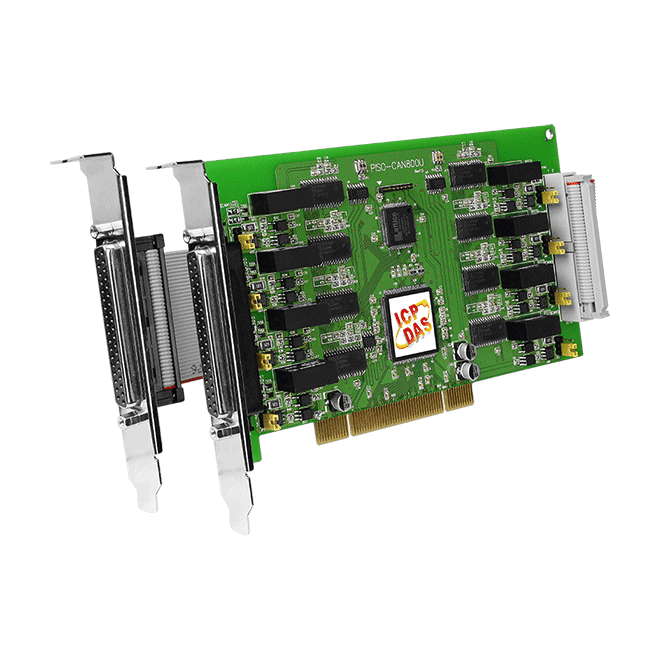
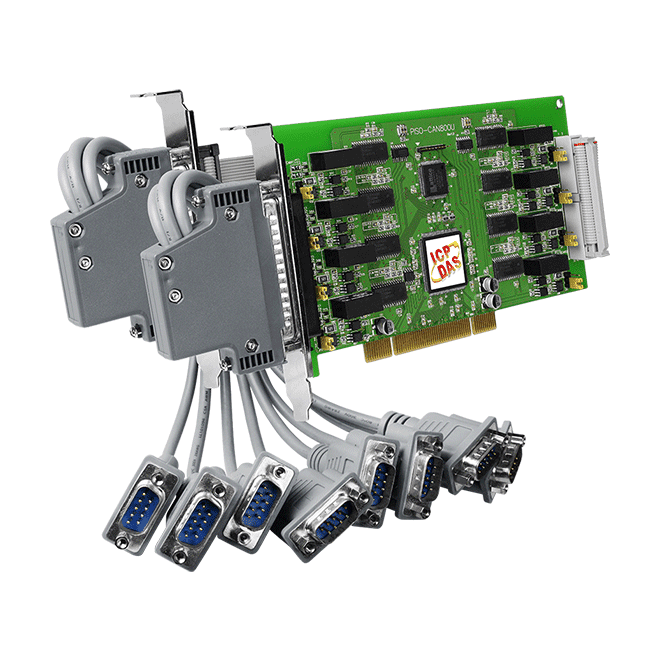
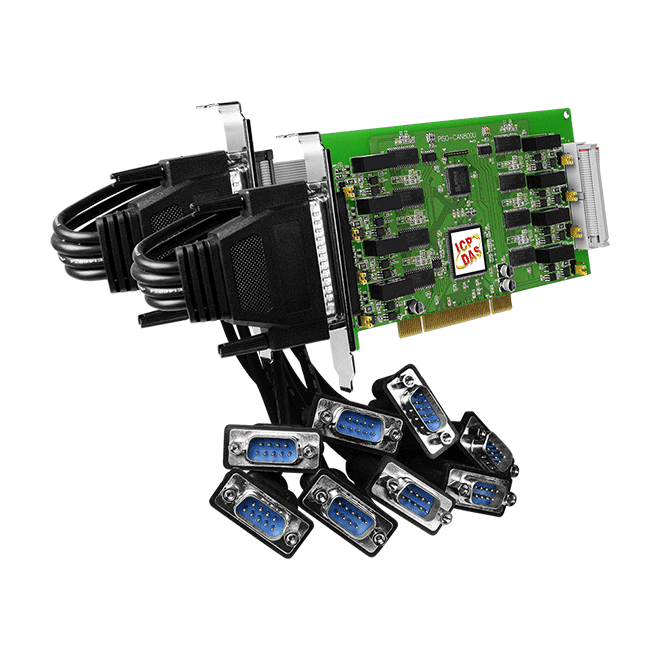
The CAN (Controller Area Network) is a serial communication protocol, and efficiently supports distributed real-time control with a very high level of security. It is an especially suit for networking "intelligent" devices as well as sensors and actuators within a system or sub-system. In CAN networks, there is no addressing of subscribers or stations in the conventional sense, but instead prioritized messages are transmitted. As standalone CAN controller, PISO-CAN800U-D can represent an economic solution of an active CAN board. It has eight independent CAN bus communication ports and has the ability to cover a wide range of CAN applications. Besides, PISO-CAN800U-D uses the new CAN controller Phillips SJA1000T and transceiver TJA1042, which provide bus arbitration, error detection with auto correction and re-transmission function. It can be installed in a 5V PCI slot and supported truly “Plug & play”.
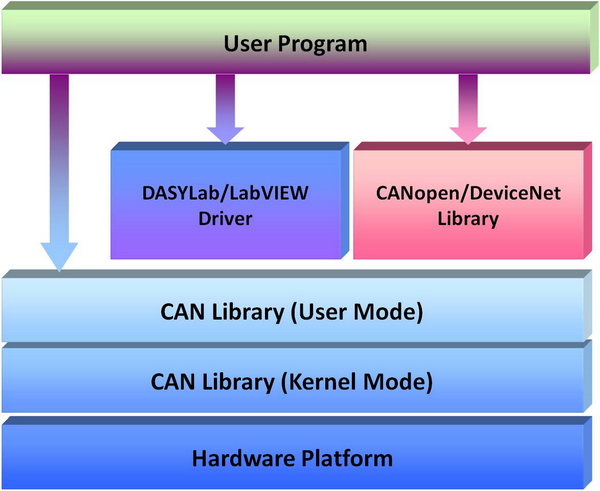

In order to apply the PISO-CAN800U-D to CAN network with NI LabVIEW, we provides a LabVIEW 7/7.1 toolkit for the purpose. It is a useful tool to develop the CAN-relative application in NI LabVIEW environment by using PISO-CAN800U-D. It is easy to use and can help user to rapidly reduce their program development cycle. If users want to develop a LabVIEW industrial application with CAN network, the LabVIEW CAN driver is very helpful.
CAN LabVIEW Tool Features:
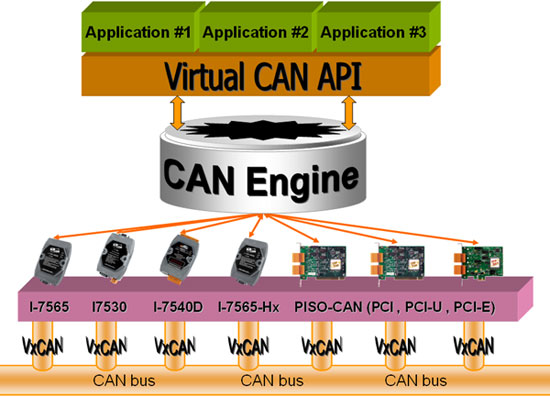
There are various communication interfaces among the CAN devices like PCI CAN board, Ethernet series and RS-232 series CAN module. According to different purpose of users’ projects, the users maybe need to choice different CAN products. Because of this situation, the programmer should develop different communication program to handle different CAN device. For example, the user should develop “Socket Client” to communicate with I-7540. When using I-7530, the users need “UART” technique to communicate with it. Nowadays, ICP DAS develop the Virtual CAN technique. The Virtual CAN driver is the excellent tool for users. It transforms whole CAN devices into Virtual CAN port. And then it generates Virtual CAN port like “VxCAN 1” or “VxCAN 2”. The users could send and receive CAN message by appointing the Virtual CAN port number. The users don't need to care about what kind of CAN device which is used.

InduSoft Web Studio is a powerful, integrated collection of automation tools that includes all the building blocks needed to develop modern Human Machine Interfaces (HMI), Supervisory Control and Data Acquisition (SCADA) systems, and embedded instrumentation and control application.
In order to apply the field bus communication by InduSoft software, ICP DAS provides several field bus components such as CAN, CANopen, DeviceNet and so on, in the InduSoft driver. By means of these drivers, you don't need to have the complex and abstruse background of these field bus protocols. Only few simple steps can finish the communication between your PC and the remote devices.
| PC Platform | File Select |
| WinXP / Win7 | InduSoft CAN Driver (IDCAN) for PC/XPAC-8000 (The InduSoft driver list ) |
| Supported Devices | |
| CAN bus series | I-7530, I-7530A, I-7540D, I-7565, I-7565-H1, I-7565-H2, PISO-CAN100U, PISO-CAN200U,PISO-CAN400U, PISO-CAN800U, PEX-CAN200i, PISO-CM100U |
| CANopen series | PISO-CPM100U, I-7565-CPM |
| DeviceNet series | PISO-DNM100U, I-7565-DNM |
| PAC Platform | File Select |
| XPAC-8000 / XPAC-8000-Atom | InduSoft CAN Driver (IDCAN) for PC/XPAC-8000 (The InduSoft driver list ) |
| XPAC-8000-CE6 / XPAC-8000-Atom-CE6 | InduSoft CAN Driver (IDCAN) for XPAC-8000-CE6 (The InduSoft driver list ) |
| WinPAC / ViewPAC | InduSoft CAN Driver (IDCAN) for WinPAC and ViewPAC (The InduSoft driver list ) |
| Supported Device | |
| CAN bus series | I-8120W |
| CANopen series | I-8123W |
| DeviceNet series | I-8124W |
Platform:
OS:Windows XP SP 3
CPU:Intel(R) Core(TM) i3 CPU 550 @ 3.20GHz
RAM:1.8GB
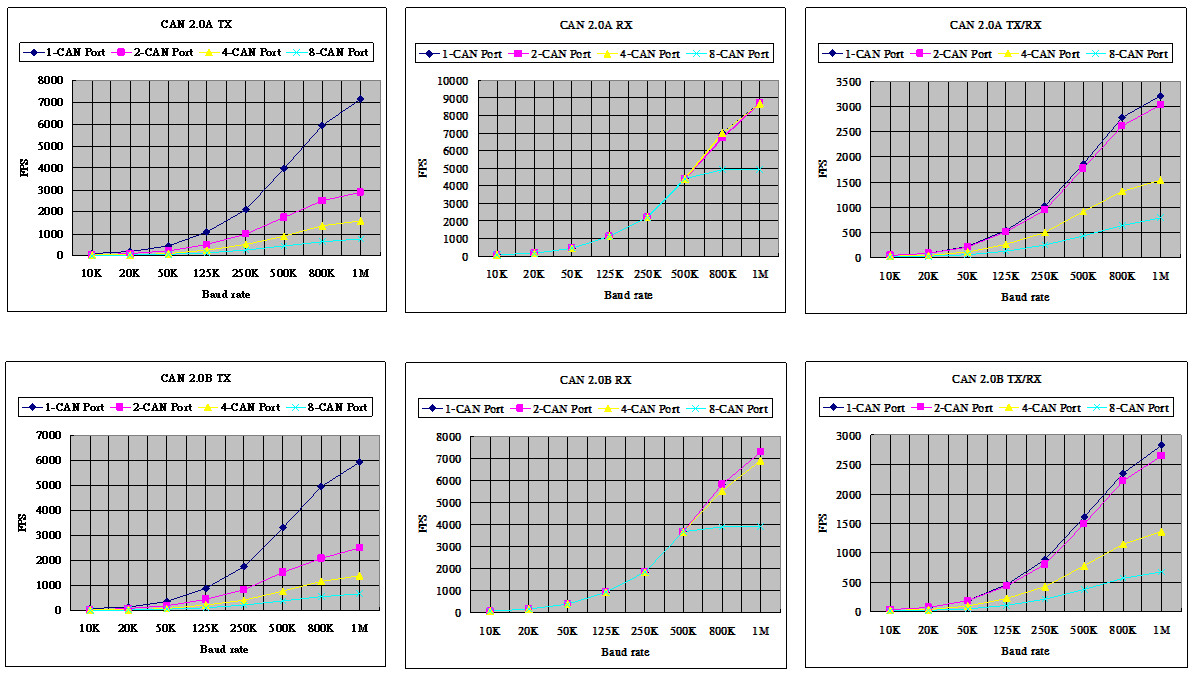
The 1/2/4/8 CAN ports send, receive or send/receive 100,000 CAN messages at the same time. The average FPS values are shown below:
| Baud rate (bps) | 1-CAN Port | 2-CAN Port | ||||||||||
| 2.0A, 8 bytes data | 2.0B, 8 bytes data | 2.0A, 8 bytes data | 2.0B, 8 bytes data | |||||||||
| TX (FPS) | RX (FPS) | TX/RX (Times/Sec) | TX (FPS) | RX (FPS) | TX/RX (Times/Sec) | TX (FPS) | RX (FPS) | TX/RX (Times/Sec) | TX (FPS) | RX (FPS) | TX/RX (Times/Sec) | |
| 10K | 88 | 88 | 43 | 73 | 73 | 37 | 44 | 88 | 43 | 37 | 73 | 37 |
| 20K | 176 | 176 | 87 | 146 | 146 | 75 | 88 | 176 | 87 | 73 | 146 | 75 |
| 50K | 440 | 441 | 218 | 365 | 367 | 188 | 218 | 441 | 213 | 181 | 367 | 184 |
| 125K | 1088 | 1104 | 537 | 899 | 917 | 461 | 523 | 1104 | 509 | 436 | 917 | 432 |
| 250K | 2100 | 2208 | 1025 | 1745 | 1834 | 882 | 984 | 2208 | 935 | 832 | 1834 | 804 |
| 500K | 3975 | 4414 | 1856 | 3305 | 3668 | 1612 | 1739 | 4414 | 1769 | 1528 | 3667 | 1492 |
| 800K | 5930 | 7008 | 2787 | 4950 | 5830 | 2355 | 2501 | 6701 | 2609 | 2096 | 5825 | 2226 |
| 1M | 7129 | 8722 | 3216 | 5926 | 7257 | 2820 | 2879 | 8716 | 3023 | 2506 | 7259 | 2650 |
| Baud rate (bps) | 4-CAN Port | 8-CAN Port | ||||||||||
| 2.0A, 8 bytes data | 2.0B, 8 bytes data | 2.0A, 8 bytes data | 2.0B, 8 bytes data | |||||||||
| TX (FPS) | RX (FPS) | TX/RX (Times/Sec) | TX (FPS) | RX (FPS) | TX/RX (Times/Sec) | TX (FPS) | RX (FPS) | TX/RX (Times/Sec) | TX (FPS) | RX (FPS) | TX/RX (Times/Sec) | |
| 10K | 22 | 88 | 22 | 18 | 73 | 19 | 11 | 88 | 11 | 9 | 73 | 9 |
| 20K | 44 | 176 | 44 | 36 | 146 | 38 | 22 | 176 | 22 | 18 | 146 | 19 |
| 50K | 109 | 441 | 108 | 91 | 366 | 93 | 54 | 441 | 54 | 45 | 367 | 46 |
| 125K | 265 | 1103 | 257 | 221 | 916 | 222 | 132 | 1103 | 129 | 110 | 916 | 111 |
| 250K | 505 | 2205 | 492 | 424 | 1832 | 424 | 254 | 2205 | 243 | 221 | 1832 | 208 |
| 500K | 903 | 4409 | 917 | 782 | 3664 | 783 | 447 | 4408 | 435 | 385 | 3662 | 383 |
| 800K | 1365 | 7010 | 1317 | 1161 | 5546 | 1150 | 639 | 4905 | 637 | 553 | 3903 | 569 |
| 1M | 1598 | 8691 | 1541 | 1385 | 6901 | 1359 | 757 | 4903 | 795 | 658 | 3905 | 673 |
| Software | |
|---|---|
| Driver | Windows XP/7/8/10 (32-bit/64-bit OS), Linux 2.6.x ~ 5.4.0, LabView, InduSoft |
| SDK | VB 6.0, VC++ 6.0, BCB 6.0, Delphi 4.0, C.Net, VB.Net |
| PC Bus | |
|---|---|
| Type | Universal PCI, 3.3 V and 5 V, 33 MHz, 32-bit, plug and play |
| CAN | |
|---|---|
| Controller | NXP SJA1000T with 16 MHz clock |
| Ports | 8 |
| Baud Rate | 10 k ~ 1 M bps |
| Isolation | 3000 VDC for DC-to-DC, 2500 Vrms for photo-couple |
| Terminal Resistor | Jumper for 120 terminal resistor |
| Power | |
|---|---|
| Consumption | 800 mA @ 5 V |
| Mechanical | |
|---|---|
| Dimensions (mm) | 193 x 93 x 22 (W x L x D) |
| Environment | |
|---|---|
| Operating Temperature | 0 ~ +60 °C |
| Storage Temperature | -20 ~ +70 °C |
| Humidity | 5 ~ 85% RH, Non-condensing |
Our mission is to provide the absolute best customer experience in industrial automation and electronics, without exception.


Subscribe to our mailing list today and join thousands of others who want to stay up-to-date with the latest news in data acquisition and industrial data communication.
ICP DAS USA is a leading manufacturer of industrial data acquisition, data communication, programmable controllers, wireless and software solutions.
Add a review
Your email address will not be published. Required fields are marked *