
If the analog input (AI) status displayed by the EIP-2000 Series module does not match the real-world signal, verify the hardware configuration and firmware version using the steps below.
First, check the jumper settings on the module. The jumper position must match the signal type being measured.
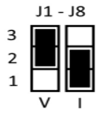
If the channel is measuring voltage, the jumper must be set to the voltage position. If the channel is measuring current, the jumper must be set to the current position. Incorrect jumper configuration will cause inaccurate readings or invalid status values.
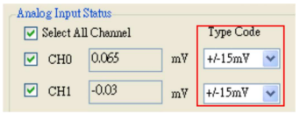
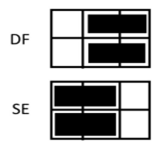
Next, verify the input connection mode in the EIP-2000 Utility Software. If the module configuration shows Single-Ended (SE), the jumper must also be placed in the SE position. If the module configuration shows Differential (DF), the jumper must be placed in the DF position. Mismatched jumper and software configuration settings can result in incorrect analog input data.
Finally, confirm that the module firmware is up to date. Updating the firmware ensures compatibility with the latest utility software, improves measurement stability, and resolves known data interpretation issues.
Following these steps resolves most analog input accuracy and status mismatch issues for EtherNet/IP industrial control systems.


