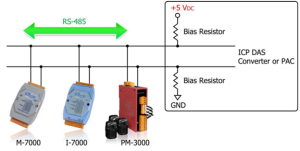
If the PM-3133 Series power meter cannot communicate over RS-485, verify the following configuration and wiring parameters.
Modbus address.
Confirm the device address matches the master configuration. The default address is 1.
Baud rate.
Ensure both devices are using the same baud rate. The default baud rate is 19,200 bps.
Stop bit.
Confirm stop bit configuration matches on both sides. The default stop bit is 1.
RS-485 wiring polarity.
Verify the differential wiring is correct. D+ must connect to D+ and D− must connect to D−.
RS-485 biasing.
RS-485 networks require proper biasing to maintain stable logic levels. Confirm that the RS-485 master provides biasing. If biasing is not available, add an external biasing module such as the TM-SG4 or SG-785 signal conditioner. All ICP DAS controllers and converters include built-in biasing, eliminating the need for external bias modules in most installations.
Following these steps resolves most RS-485 Modbus communication issues during commissioning and troubleshooting.