
If the IP address of an EIP-2000 Series module is unknown, the device can be restored to its factory default network settings using firmware mode and the configuration utility.
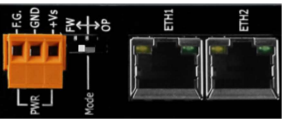
Begin by setting the module to FW mode and rebooting the device. This resets the IP configuration to factory defaults.
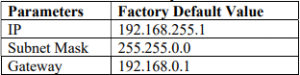
Connect the module directly to your Ethernet network or PC. Configure your computer’s IP address to the 192.168.255.xx subnet so it is on the same network segment as the module.
Launch the EIP-2000 Utility Software and perform a network scan to locate the device. Once detected, you can assign a new static IP address or DHCP configuration as required for your control system.
This recovery method is commonly used during commissioning, maintenance, and network reconfiguration of EtherNet/IP industrial automation systems.


