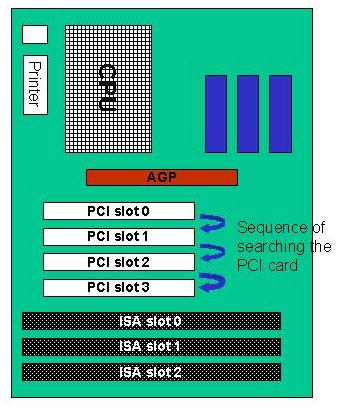
A: Please refer to the “PciCardNo.jpg” picture.
In normal PC, the PCI card in the slot closest to the CPU will be the first one, and so on.
Please note:
- Driver always search the PCI card one by one from the PCI slot-0.
- Driver search the PCI cards via the PCI bus controller (offset 0xCFC and 0xCF8 registers).
- Driver identifies the PCI card by Vendor-ID, Device-ID, SubVendor-ID and SubDevice-ID.
- The base-address of every PCI card maybe changed while the system is adding/removing PCI card(s).
- Some BIOS supports “OS PnP” feature. If the driver has problem to work with the PCI card(s), please try todisable the “OS PnP” setting and then try again.


