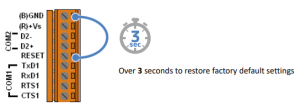
To restore the ICP DAS MDC-711 to factory default settings, short the RESET and GND pins for more than 3 seconds while the unit is powered on. During the reset process, the 7-segment LED will display “RESET.” After completion, the device will revert to its default network settings: IP address 192.168.255.1, subnet mask 255.255.0.0, and gateway 192.168.0.1. All custom configurations will be cleared, including user accounts, Modbus polling definitions, and network parameters, allowing you to reconfigure the unit from a known default state.