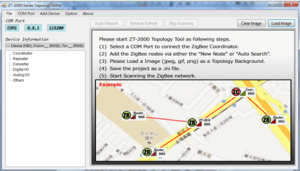
Wireless signal performance depends on site conditions such as building materials, distance, electromagnetic interference, and physical obstructions. For optimal performance of the ICP DAS ZT-2000 Series ZigBee wireless I/O modules, it is recommended to measure signal quality before permanent installation using the ZT-2000 Utility Software.
The utility allows users to evaluate signal strength and link quality in the target environment, helping determine optimal device placement and antenna configuration.
https://www.icpdas.com/en/download/show.php?num=2845&model=ZT-2015
Best practices to improve ZigBee signal strength include:
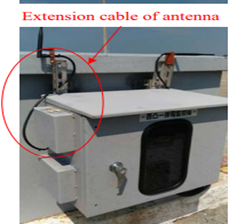
Use antenna extension cables.
Extension cables allow antennas to be repositioned away from metal enclosures or obstructions. To minimize signal attenuation, the recommended cable length is 1 to 3 meters. ICP DAS offers compatible antenna extension cables in the 3S00x-1 Series.
Adjust RF transmission power.
Using the ZT-2000 Utility, users can increase the RF power setting to improve transmission range. Higher RF power increases signal strength; however, RF Power = 08 complies with CE and FCC regulatory limits.
Upgrade the antenna gain.
Replacing the standard 5 dBi 2.4 GHz antenna with a higher-gain antenna, such as an 8 dBi 2.4 GHz antenna, can improve range and signal stability in larger facilities.
Optimize antenna placement.
Mount antennas vertically and away from metal surfaces, electrical panels, and large machinery to reduce signal reflection and absorption.
Implementing these steps improves ZigBee communication reliability for remote I/O expansion, factory automation, building automation, energy monitoring, and wireless sensor networks.
Please refer to the 3S00x-1 series in the link:
https://icpdasusa.com/cablesandaccessories/