

Connect all of your serial devices to Ethernet — easily and efficiently.
PLCs, barcode readers, RFID readers, meters, motion controllers, and many other serial devices have been widely used across industries for decades. To make the most of their data and enable convenient remote control, it’s essential to integrate these devices with modern networks.
The key to achieving this integration lies in the PDS series.
All PDS models feature programmable capabilities, allowing you to turn your innovative ideas into real-world applications. Let’s take a closer look at what makes the PDS series exceptional.
The PDS series includes XServer (with library included), which allows users to easily develop their own value-added firmware.

For example, while devices can communicate directly with one another, the growing diversity and number of devices often create communication limitations — especially when using a non-programmable device server that cannot interpret multiple communication languages.
Here’s where the PDS stands out:
With its programmable capability, users can write custom protocol conversion logic, effectively turning the PDS into a real-time translator that ensures seamless communication between different devices.
Beyond protocol translation, the PDS enables advanced integration by combining devices and digital I/O (DI/DO) channels for complex applications — something that a non-programmable device server cannot achieve.
This programmable flexibility gives your projects a significant competitive advantage, allowing you to deliver smarter, more customized solutions.
There are two primary ways to access serial devices through the PDS on the PC side:
TCP/IP Communication
Virtual COM, developed by ICP DAS
With Virtual COM, the PDS’s COM ports are perfectly integrated with your PC system.
Using the VxComm driver, you can easily map the PDS’s COM ports as if they were physical COM ports on your PC — eliminating the need to rewrite your existing software. This makes it simple to access serial devices over the Internet without reprogramming.
Using the VxComm utility, you can:
-Automatically scan and configure PDS modules,
-Perform batch COM mapping in seconds, and
-Use the built-in communication test function for diagnostics.

If your software system can only access a limited number of COM ports, or you want to avoid extensive revisions to add more ports, the Dynamic Virtual COM Mapping function offers an elegant solution.
This feature allows extended COM ports to be mapped to different PDS devices dynamically — and with just a simple API call, the mapping can be changed on demand.
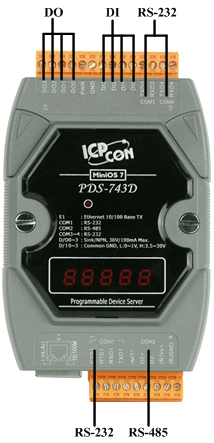
The PDS-700 series offers a range of configurations, from 2 COM ports up to 8 COM ports.
Some models even include up to 6 digital inputs (DI) and 7 digital outputs (DO).
With over 10 models available, there’s a PDS to fit every industrial application.
(Example: PDS-743)
Virtual I/O technology extends the concept of Virtual COM.
It functions similarly, but instead of virtualizing serial ports, Virtual I/O turns the PDS’s digital I/Os into PC-accessible I/O ports.
This allows you to access the PDS’s digital I/Os directly using the DCON protocol.
Additionally, the DCON Utility supports configuration of PDS digital I/Os through Virtual COM — enabling basic function tests or I/O control applications in a simple and convenient way.

Why choose the PDS over a traditional PC-based solution?
| Feature | PC Solution | PDS-700 / PDS-8×1 Solution |
|---|---|---|
| Size | Large | Compact (palm-sized) & DIN-rail mountable |
| Cost | Expensive | Cost-effective |
| Maintenance | Requires regular maintenance (fragile fan & hard disk) | Maintenance-free (fanless, no hard disk) |
| Operating System | Unstable OS | Stable, high-performance MiniOS7 |
| Boot Time | Several minutes | Less than 1 second |
| Power Consumption | High (hundreds of watts) | Very low (~3 watts) |
| Virus Issues | Vulnerable | Immune to viruses |
| Serial Ports | Limited (1–2 ports, RS-232 only) | Multiple ports (2–8 ports, RS-232/422/485) |
| Temperature Range | 0°C to +50°C | –25°C to +75°C |
| Additional Features | — | Built-in DI/DO, Programmable, Watchdogs |


