
Logging data has many benefits. It can help you save energy, improve efficiency, troubleshoot problems, or identify trends. There are many different ways to log data — with a simple data logger, an embedded controller, or data acquisition modules connected to your PC. You can log at intervals such as every minute, every 10 minutes, or every hour. Most of these systems take only about 5 minutes to set up.
A stand-alone data logger can be configured using your PC, where you set the desired logging interval (for example, every 10 minutes). After configuring it, you leave it in place for the desired duration, such as five days. When finished, reconnect the data logger to your PC to retrieve the logged data.
You can export the data into spreadsheets to create charts for analysis. Logging data can help forecast future temperature and humidity and determine whether an environment requires industrial-grade hardware for extreme conditions. An example of a stand-alone temperature and humidity data logger is the DL-100T485. If your PC does not have an RS-485 port, a USB-to-RS-485 converter such as the I-7561U (with Windows 7, Vista, XP, and Linux drivers) can be used.
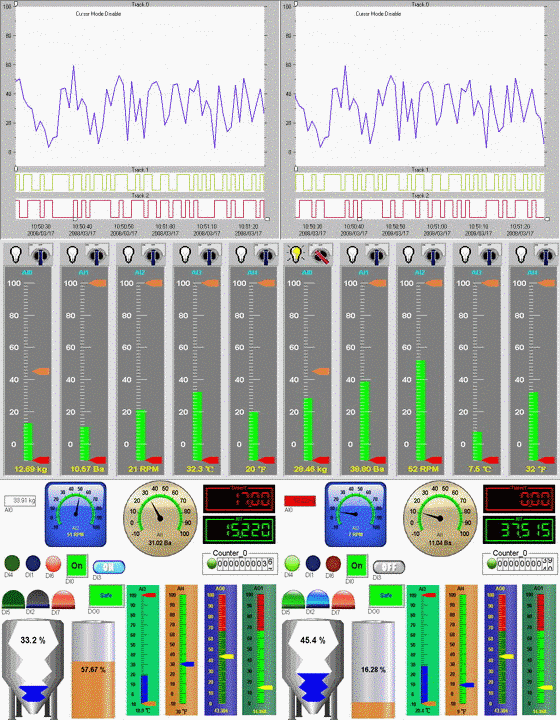
You can log data using an Ethernet-based data acquisition module and data logging software on your PC. Software like Free EZ Data Logger allows you to log data from modules such as the ET-7018Z/S. You can log values such as current, voltage, temperature, and humidity. Sensors are wired into the terminal block of the data acquisition module, which sends the information to the PC. Reports can be exported to Excel or viewed in an Access database. The amount of data you can collect depends on the available storage on your computer. Buttons can also be created in the software to trigger outputs, and email alarms can be sent based on conditions.
Wireless data logging can be done by connecting a wireless host converter to your PC. The wireless data acquisition module communicates with the PC through wireless transmission.
ZigBee is a robust, easy-to-set-up wireless solution. Each ZigBee network uses an RF channel and a PAN ID, configured via a free software utility, and each module has a unique node ID.
The ZT-2550 is a ZigBee host device that connects to a PC, while the ZT-2060 is a wireless data acquisition module used for tasks such as turning lights on and off.
Free software like EZ Data Logger can log wireless activity over time. Logged data can reveal trends or help identify energy-saving opportunities.
Embedded controllers with onboard I/O and an internal operating system, such as Windows CE.NET 5.0, can also be used for data logging. For example, the WP-5141-XW-107 has 8 digital inputs and 8 digital outputs and can log data onto a microSD card. A data logging system can be created using free software like eLogger, which interfaces directly with the onboard I/O. If a digital motion sensor is connected, the system can log every instance the sensor is triggered.
You can also log data with a data acquisition board installed inside your PC. Software can be developed using C Language or platforms like LabView. An example of a PCI data acquisition board is the PCI-DA4U, which features 4 analog outputs, 16 digital inputs, and 16 digital outputs. Linux, Visual Basic, Borland C, LabView, and DasyLab demo programs are available to simplify development and reduce project time.


